Stop conditions
Last updated: September 20, 2026
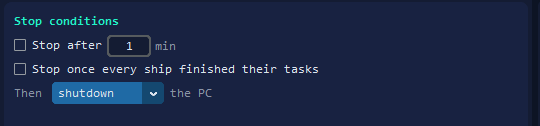
A run does not have to be watched. Tell it when to end, in the General tab.
Stop after a time
Tick Stop after and give it minutes. The run ends when the time is up.
Or stop when the work is done
Stop once every ship finished their tasks ends the run when each ship has spent its budget. A ship with no work does not keep the run alive.
Then the PC
The Then list can leave the PC alone, put it to sleep, or shut it down. With shutdown chosen, the machine only switches off once the last ship is on its way home.
Per ship, not only per run
Each ship can also have its own budget in kills, minutes or trips home — see per-ship budgets. Whichever comes first ends the work.
Quick answers
Can the bot shut my PC down when it is done?
Yes. Choose shutdown or hibernate in Then, and the PC only switches off once the last ship is on its way home.
What does stopping once every ship finished mean?
The run ends when each ship has done its work. A ship with nothing to do no longer holds the run open.
Where are the stop conditions?
In the General tab, on the right. The budget of each ship is set separately, per ship.