Frequently Asked Questions
- What is the best free Star Trek Fleet Command bot for PC?
-
Anbots is a free STFC bot for the official Star Trek Fleet Command PC client on Windows: no BlueStacks, no Android emulator, a code-signed installer, maintained since 2023. It hunts hostiles, mines, runs solo armadas and side actions on up to 8 drydocks at once. Without any licence it runs with reduced limits; a free licence lasts 7 days, is renewable every week and needs nothing but an email address.
- Is there a bot for Star Trek Fleet Command on PC?
-
Yes. Anbots is a free automation bot for Star Trek Fleet Command on PC. It automates hostile farming, resource mining, and base management natively on the official STFC PC client.
- Is Anbots completely free?
-
Yes. Anbots NG is free to download and use. Without any licence you get 30 minutes of farming a day on 1 drydock. A free 7-day licence, renewable every week and needing only an email address, raises that to 1 hour, 2 drydocks and 200 hostiles a day. Premium removes the limits and drives 8 drydocks.
- Does the STFC bot require BlueStacks?
-
No. Anbots works directly with the official Star Trek Fleet Command PC client; no Android emulator like BlueStacks is needed.
- Can I get banned for using a bot in Star Trek Fleet Command?
-
Possibly. Using any third-party automation in Star Trek Fleet Command is against Scopely's terms of service, and it carries a real risk of account action, up to suspension or a permanent ban. Anbots is an independent tool, not affiliated with, endorsed by or sponsored by Scopely, and it makes no promise of immunity from account action: the risk is yours, and running it is your own decision.
- Is using a bot against the game's Terms of Service?
-
Yes. Scopely's terms of service for Star Trek Fleet Command prohibit third-party automation. Anbots does not change that and claims no agreement or tolerance from Scopely. We say so plainly so you can make an informed choice; what the bot does and does not do is listed on the features page.
- How do I automate farming in Star Trek Fleet Command?
-
Download Anbots, install it on your Windows PC, launch the STFC PC client, then start the bot. Configure your target hostile type, enable auto farm mode — the bot handles targeting, attacking, repairing, and returning to base automatically. See the Getting Started guide for full instructions.
- Does Anbots work on Windows 11?
-
Yes. Anbots NG runs on Windows 10 and 11, 64-bit. Anbots Classic, the legacy version, also runs on Windows 7 and 8.
About Anbots STFC Bot
- Does the game window need to stay in front?
-
No. Anbots NG is background-friendly: it works while the game is behind your other windows. It borrows the mouse for a few milliseconds per click and puts it back where it was. Anbots Classic, the legacy version, does need the game visible in front.
- Do I need a new licence for Anbots NG?
-
No. The same licence email works on Anbots NG and Anbots Classic.
- Where is Anbots Classic?
-
Anbots Classic is no longer distributed. Anbots NG has replaced it and reads the same licence email, so your account is unaffected. If Classic is still installed on your PC it keeps working, but it receives no updates.
- Which version should I choose?
-
Anbots NG. Base raiding is in NG as well, on Premium. The sections below marked "Anbots Classic" only apply to the legacy version.
Anbots NG
- What is the KoS (Kill On Sight)
-
This functionnality allows you to specify a favorite hostile type. The bot looks for that type in the system first and attacks it. If none is present, it falls back to the standard target selection. This is usefull to get ferengi, apex,scout,...
- Is Anbots Classic compatible with Ripper's mod?
-
Yes it is with some adaptation to the toml (config file). For more information, join the Ripper's Discord Please use the default one and adapt ui_scale = 0.75 & zoom = 2000 & use_scopely_hotkeys = true
Functionality
- My bot changed of system overnight
-
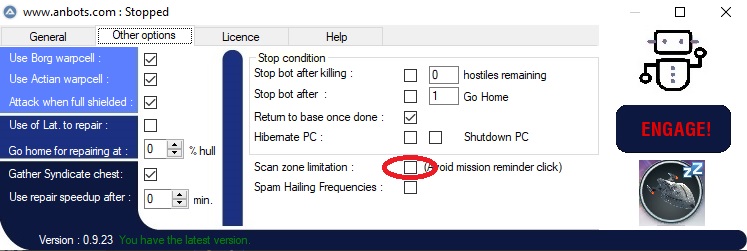 This may happen if the bot clicks on a mission reminder (for long mission description).
You may always finish all missions or use the specific option that will reduce scanning zone, avoiding mission reminder.
This may happen if the bot clicks on a mission reminder (for long mission description).
You may always finish all missions or use the specific option that will reduce scanning zone, avoiding mission reminder.
- My bot does not come back home once full cargo
-
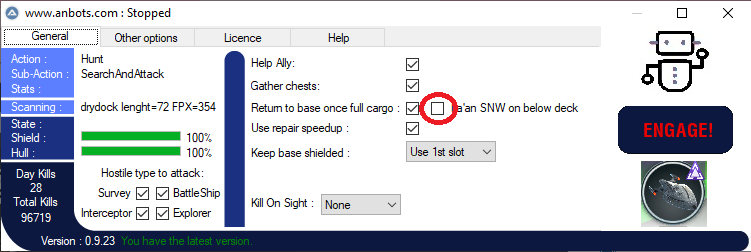 This may happen if the bot does not detect the full cargo because of a bug in stfc.
Probably because of La'an on below deck. To avoid this, just use the dedicated option.
This may happen if the bot does not detect the full cargo because of a bug in stfc.
Probably because of La'an on below deck. To avoid this, just use the dedicated option.
- My bot fight well in DS, he comes back to DS but is stuck in Galaxy view
-
It comes from a wrong shortcut definition. Please ensure that the SPACE bar does a Relocate. (If Ripper's, use the provided toml, id not, check shortcut in the stfc client)
- My bot sometimes take a long time to start or seems not reponding at start
-
It comes from some latence in the network. Stay calm and wait a bit or kill & restrat the bot.
- My bot has a strange behaviour or raise strange error messages
-
Try to start it in Administrator mode. Post the 'Help' tab information in the discord.
- Can I have infitine latinium and materials ?
-
No :-) The purpose of this bot is only to help players to do annoying/time consuming tasks and get some free time to drink beers :-) Nothing more, nothing less.
- My bot sometimes scan the zone without targetting any hostiles
-
That's a rare behaviour that should be corrected if you restart the bot. If not, take a print-screen and send it to Andreb on the discord.
Behaviour (Anbots Classic)
- May I have infinite latinium ?
-
Of course... but use your credit card to buy latinium pack.
- Will you develop an infinite hull cheat ?
-
Sure.... hummm... No
Other
- Other problems ?
-
Join the Discord. Discord