Mining
Last updated: September 20, 2026
Mining runs like hunting: you pick where the ship goes and what it should bring back, and it works on its own.
1. Send a drydock mining
In the Fleet tab, type the system in Destination and set the Mode to mine. Then choose the resource you want among those that system actually offers.
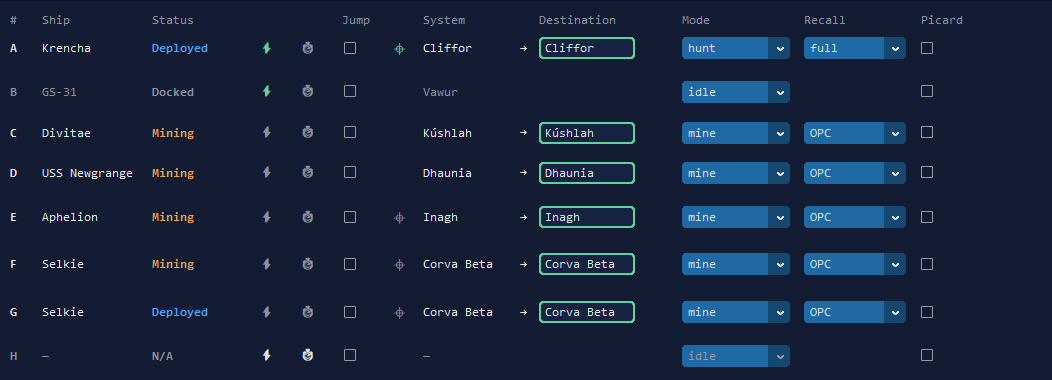
2. What the ship does
- It flies in, starts mining as soon as it arrives, and fires its mining ability on the way in so it lands protected.
- If no node of your resource is free, it waits and tells you, rather than mining something else.
- When a node runs dry, it waits a moment for its own node to free up and goes back to it.
- It leaves alone a node another player is sitting on, and the player starbases in the system.
3. Coming home
The Recall column decides when the ship comes home: when empty, at 25%, at 50%, at OPC, when full, or never. It unloads and goes back out on its own. A damaged miner comes home to repair from the moment it arrives, instead of being sent straight back onto a node.
4. Several miners at once
Each drydock has its own destination and its own resource, up to 8 with Premium. One miner waiting on a busy system does not hold up the others.
Quick answers
How does the bot choose the node?
You give the drydock a destination and the resource you want. The bot takes a free node of that resource. If there is none free, the drydock waits and says so, instead of mining something else.
Does it take a node another player is using?
No. A miner that is not sure of its target leaves the node alone, and a player starbase in the same system is left alone too.
When does my miner come home?
When the Recall column says so: when empty, at 25%, at 50%, at OPC, when full, or never. It also comes home if its hull drops below the level you set.
Can several drydocks mine at once?
Yes, each with its own destination and resource. A miner that is stuck does not hold up the others.